
Automation workflows that run the follow-up for you.
I build, fix and document automations in Zapier, Make, Google Apps Script, GoHighLevel, Keap, Kit and the tools around them. Enquiries get answered, contracts start onboarding, bookings land in the right tracker and reports update themselves. Each one is tested before it goes live and handed over with notes your team can follow.
What does automation workflow support include?
I map the process you repeat by hand, then build the automation that does it for you: lead handling, client onboarding, bookings, email sequences, trackers, dashboards and reports. I work in Zapier, Make, Google Apps Script, GoHighLevel, Keap, HubSpot, ActiveCampaign, HoneyBook, Kit, Flodesk, ClickUp and monday.com. I also repair automations that have stopped working and write down how each one runs.
Automations I have built.
A look at the builds behind this page, from a Zapier flow you can watch step by step to workflows inside GoHighLevel and Keap.
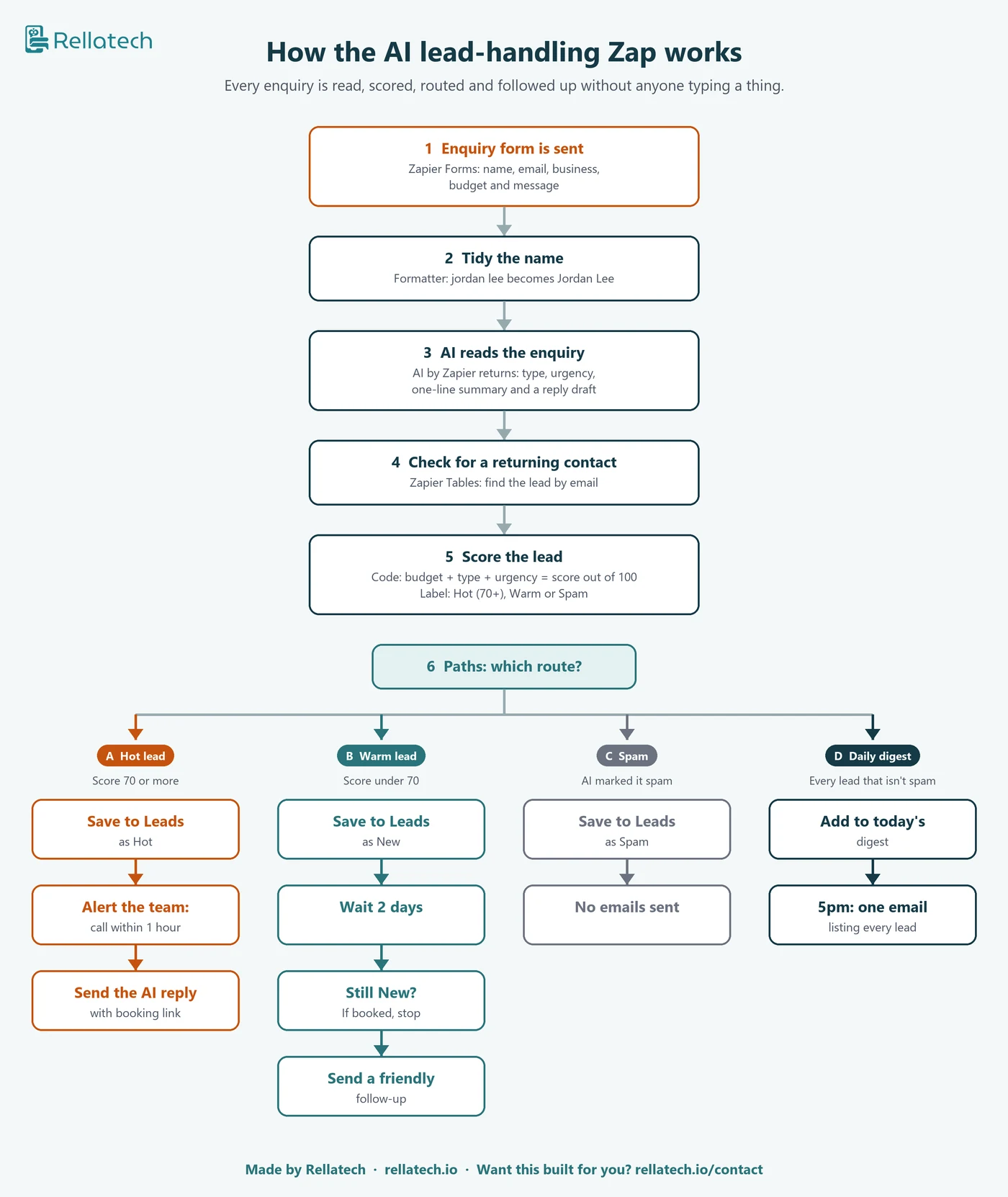
AI lead handling in Zapier
AI reads each enquiry, scores it out of 100, alerts you to hot leads and follows up warm ones.
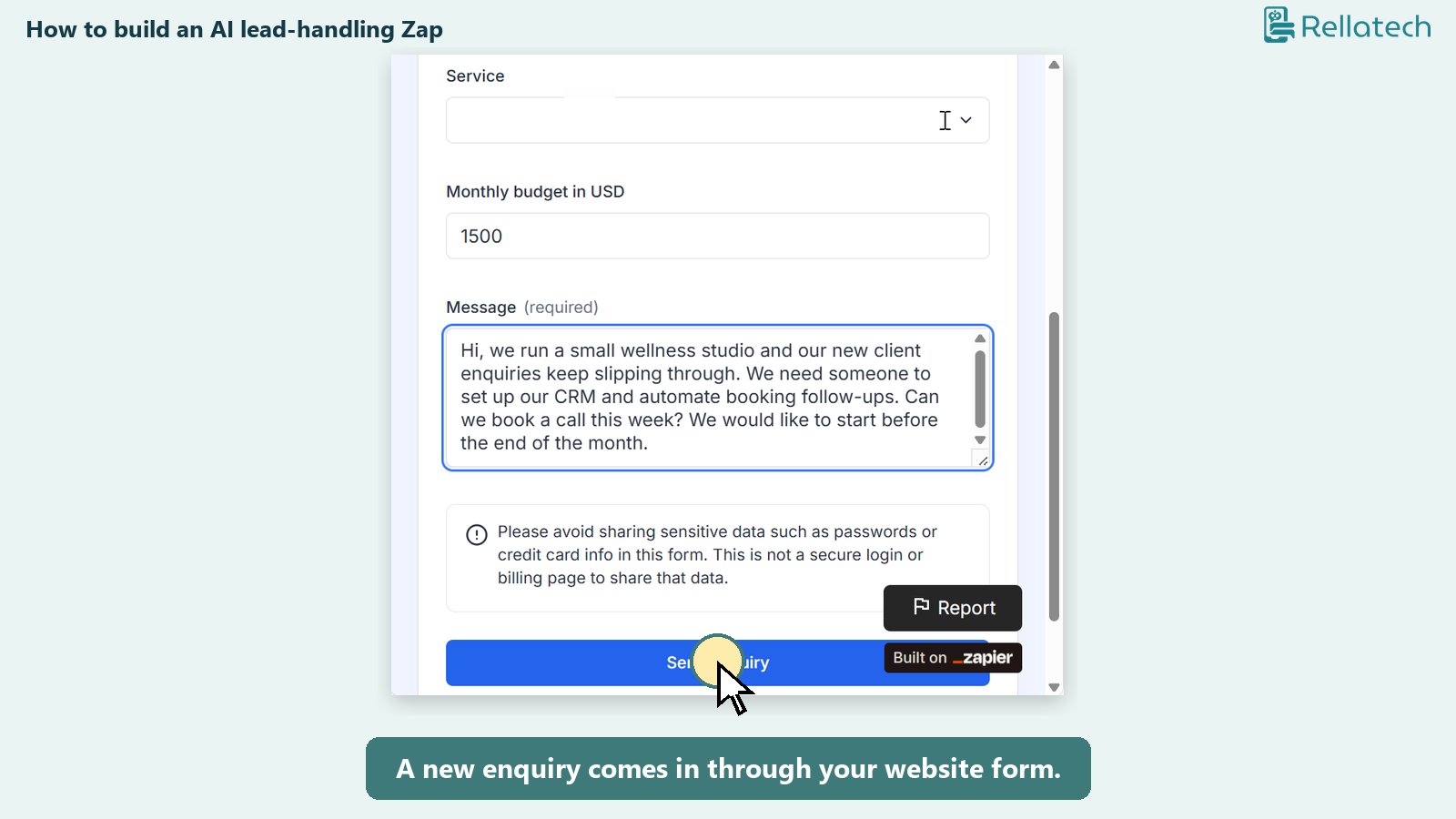
The Zap, step by step
A three-minute walkthrough of the build, with a free guide to set it up yourself.
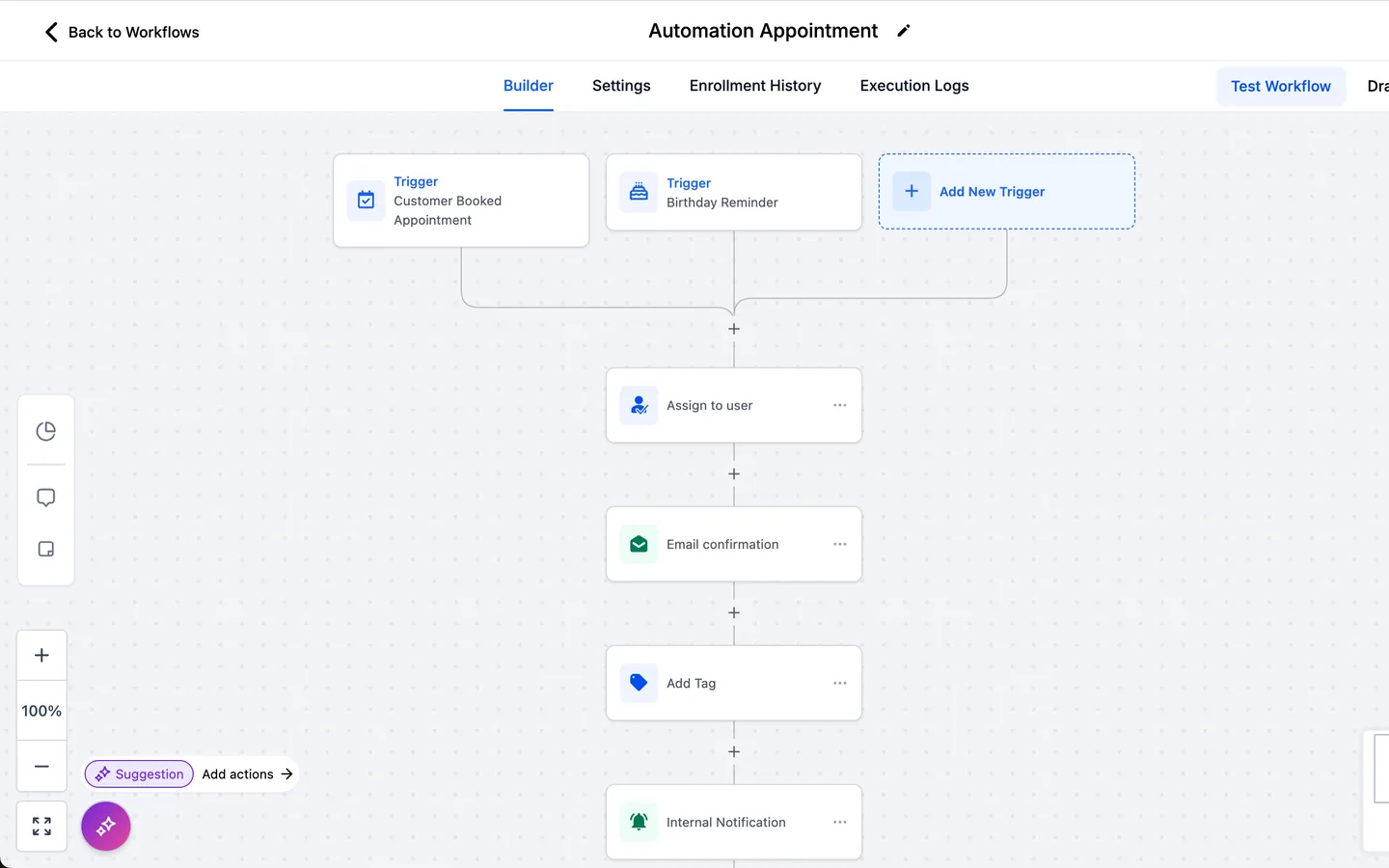
GoHighLevel workflows
Triggers, waits and conditions that move each contact through booking and follow-up.
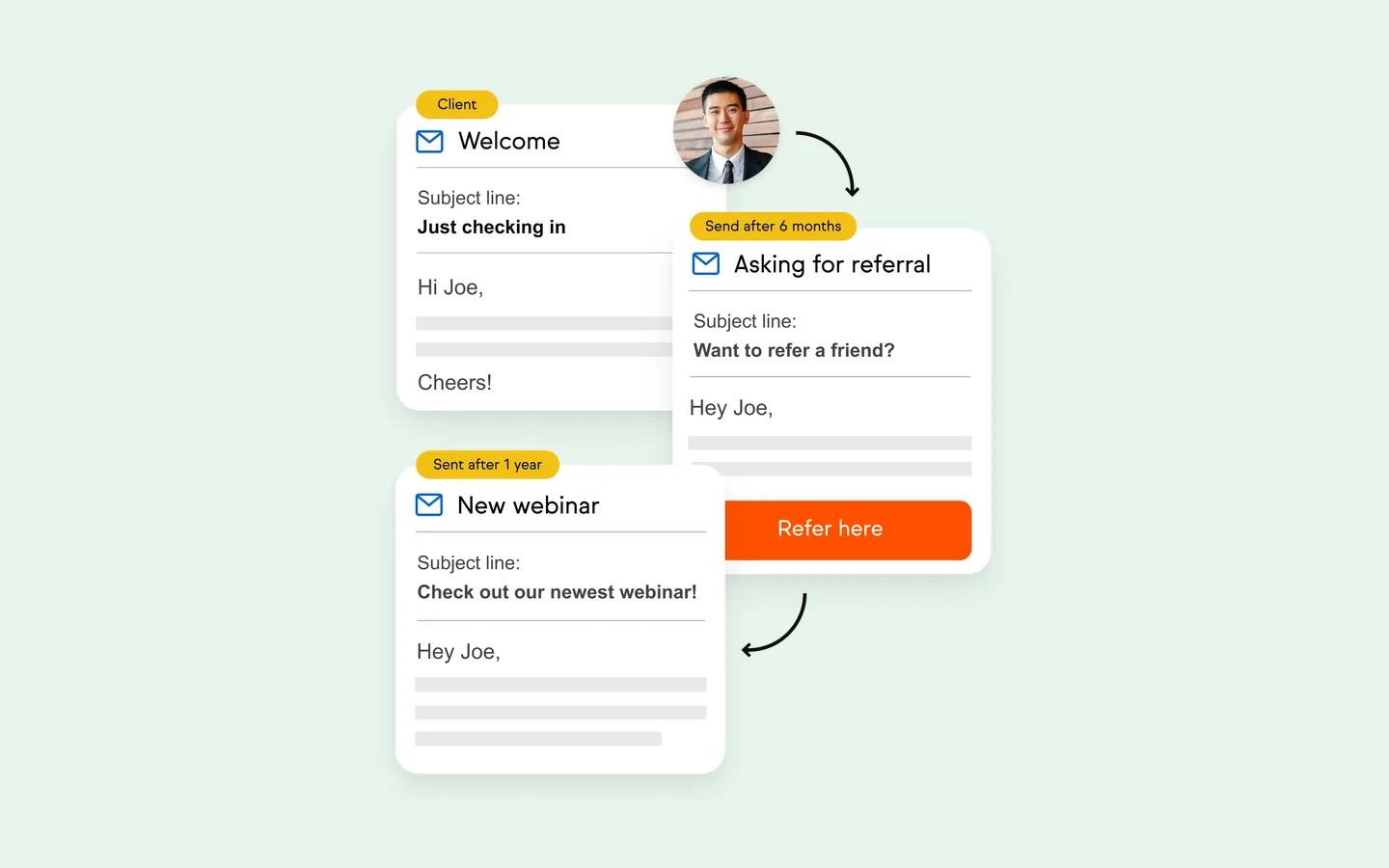
Keap email sequences
Campaigns that send the right email at the right time, tagged and tested.
Tools I automate with.
These are the platforms behind the builds on this page. If yours is not listed, ask me, because most tools connect through Zapier, Make or a script.
 Zapier
 Make
Google Apps Script
 Google Sheets
 GoHighLevel
 Keap
 HubSpot
 ActiveCampaign
 HoneyBook
 Stripe
 DocuSign
 Kit (ConvertKit)
 Flodesk
Mailchimp
Calendly
Typeform
 Stan Store
 Thinkific
 ClickUp
 monday.com
 Zendesk
 WordPress
When the same steps eat your week.
Automation helps when work follows a pattern but still depends on someone remembering it. You may be noticing that:
- Enquiries wait hours or days for a first reply.
- A signed contract or payment still needs someone to set up the client by hand.
- Form, booking and payment details are copied between tools.
- Leads sit in three places and the tracker is never up to date.
- An automation stopped working and the cause is unclear.
- The person who built your workflows left without writing anything down.
Automations I have built for clients.
AI lead handling
A Zapier build that reads each website enquiry with AI, scores it out of 100, alerts the team to call hot leads within the hour, follows up warm leads after two days and sends one summary email at 5pm.
Contract to onboarding
For Selling Circus, a signed DocuSign contract now creates the student in Thinkific, ActiveCampaign and Google Sheets through Zapier, so onboarding starts without anyone retyping details.
Payments and programme emails
For an executive coaching business, HoneyBook, Stripe, Zapier and Flodesk now send the right email at each programme stage, from payment to onboarding, with SOPs for the team.
Lead tracker sync with Apps Script
For Artist Alignment Academy, one Google Apps Script brings Typeform and Calendly data into a single lead tracker, matched by email, with no manual entry after launch.
Booking and diagnostic flows
For a coaching business, Stan Store, Zapier, Flodesk and Google Forms connected into one booking flow, with a written reference covering reminders, segments and limits.
Booking requests into job posts
For a babysitting agency, a WordPress booking form feeds a workflow that formats each parent request into a job post. The owner reviews every match before it goes out.
Healthcare intake and daily digest
Intake and status updates flow from one form into a shared Google Sheets tracker through Zapier, with a daily digest so the front desk starts each day from one list.
Email sequences in Kit
For an author, I repaired the Kit setup and built an advance reader copy workflow with three signup paths, a manual approval step, reminders and tested subscriber routes.
Course delivery emails
For Nutrient Dense Life, a branded 19-email sequence delivered on schedule across a 78-day course, with a walkthrough so the founder can maintain it herself.
Timesheets and capacity in ClickUp
Make automations behind time, workload and capacity views in an existing ClickUp workspace, including timesheet approval flows, documented and handed over.
Client journey in a wellness CRM
Pipelines with booking, contracts, payments and welcome messages connected in Ivorey, so a wellness practice can see where every client stands.
Enquiry tracking and live dashboards
A therapy practice's website and phone enquiries brought into one tracker with Google Ads conversions, and a Google Sheets dashboard that refreshes from a Zendesk workflow every hour for a support team.
Campaign tracking that stays with the record
For Lionheart Coaching Academy, campaign details from Squarespace forms are kept on each ActiveCampaign record, so registrations show where they came from.
Scripts that fix and clean up
An Apps Script that fixed a CEO's Google Slides formatting in one hour before a keynote, and a repaired tracker script that had been moving rows and zeroing counts.
GoHighLevel workflows and texting
Workflows, pipelines, calendars and reminders across GoHighLevel sub-accounts for SaaS platforms and agencies, plus texting registration so automated messages get delivered.
Keap and Infusionsoft campaigns
Campaign, tag and integration repairs in Keap and Keap Max Classic, with course platforms and schedulers connected so tags, emails and payments update on their own.
Platforms I work with.
I pick the tool that fits what you already pay for. Sometimes that is a Zap, sometimes a native workflow, sometimes a short script.
Automation
- Zapier (Paths, Tables, Digest, AI by Zapier, Code)
- Make
- Google Apps Script
- Webhooks and native integrations
CRMs
- GoHighLevel
- Keap and Keap Max Classic
- HubSpot
- ActiveCampaign
- HoneyBook
- Ivorey
- Kit (ConvertKit)
- Flodesk
- Mailchimp
Forms, bookings and payments
- Typeform
- Google Forms
- Calendly
- Stan Store
- Stripe
- DocuSign
- WordPress forms
Data and work management
- Google Sheets
- ClickUp
- monday.com
- Zendesk
- Thinkific
What a build includes
Depending on the scope we agree.
- A map of the process as it runs today, and the steps the automation will take over
- The build in your own accounts, so you own every Zap, scenario and script
- Tests with sample records for every path, including the ones that should do nothing
- Alerts or a daily summary so you know it is working
- Plain-language notes on each trigger, step and field, and what to do if something stops
- A walkthrough recording for your team
Related work.
AI lead handling
Every enquiry read, scored and followed up in Zapier, with a video walkthrough and free guide.
Contract to onboarding
DocuSign, Thinkific, ActiveCampaign and Google Sheets connected so signing starts onboarding.
Lead tracker sync
One Apps Script keeping Typeform and Calendly data in a single tracker.
I start with the process, then the tool.
Before I build anything I ask what should happen, who needs to know and what a mistake would cost. That keeps automations small, easy to follow and safe to change later.
My background is in technical support and operations, so I also look at what happens around the automation: the inbox it sends from, the person who reviews the output and the report that depends on it.
Choose a starting point.
One automation
A single defined build or repair, such as lead follow-up, onboarding or a tracker sync.
Ongoing automation support
Regular builds, fixes and checks as part of your wider support arrangement.
How a build runs.
- 01
Map the process
You walk me through the task as it happens today. I write down each step, tool and decision.
- 02
Agree the scope
I recommend what to automate first, which tool to use and what stays manual. You approve before I build.
- 03
Build and test
I build in your accounts and test every path with sample records before switching it on.
- 04
Hand over
You get notes, a walkthrough and a check-in after it has run with real records.
Automation case studies.
Connecting a Signed Contract to Onboarding
DocuSign, Zapier, Thinkific, ActiveCampaign and Google Sheets connected so a signed contract starts record creation and onboarding.
Read case studyPayment and Programme Emails for a Coaching Business
HoneyBook, Zapier, Stripe and Flodesk connected for payment, onboarding and programme-stage emails, with SOPs.
Read case studyOne Lead Tracker from Typeform and Calendly
A Google Apps Script that brings Typeform and Calendly data into one Google Sheets tracker, matched by email.
Read case studyCapacity Views in ClickUp with Make
Time, workload and capacity views in ClickUp, supported by Make automations and documented for handover.
Read case studyAutomation guides
Zapier automations for course creators
Practical connections for enrolment, onboarding, tagging and student delivery across course-business tools.
Read the guideHow to audit a Keap automation
A structured review of campaigns, tags, goals and follow-up before broken logic reaches more contacts.
Read the guideWhat does a CRM consultant do?
CRM audits, cleanup, implementation, automation and the work a consultant should document.
Read the guideCommon questions
Automation Workflows FAQ
Other ways I support businesses
CRM & Workflow Support
Cleanup, pipelines, campaigns and integrations in HubSpot, Keap, Salesforce and more.
Explore CRM & Workflow SupportGoHighLevel Solutions
Workflows, pipelines, calendars, texting and help desk support in GoHighLevel.
Explore GoHighLevel SolutionsKeap & Infusionsoft Consultant
Campaign repairs, integrations and documentation for Keap accounts.
Explore Keap & Infusionsoft ConsultantAdmin & Operations Support
Inbox, calendar, projects, SOPs and the everyday work around your systems.
Explore Admin & Operations SupportTell me which task you repeat every week.
Share the tools involved and what should happen. You can book a free call at a time that suits you, and we will map it together.
Book a free callThe booking page shows my available times, so you can choose one straight away. If you would rather write first, send a message through the contact page and I will reply within one business day.
Tell me what you need help with, and I will suggest where to start.
Book a free call